You Shipped an MCP Server or API.
Can Agents Actually Use It?
Agents are calling your endpoints without a human in the loop
Us carbon-based lifeforms aren't perfect… but we do have a knack for common sense and a strong ability to act on new information. The challenge for publishers of agent-facing endpoints is that there isn't currently much data to act on.
Agents are visiting your API or MCP server, but you can't see much of it in your logs. The agent sees your tool list, judges your descriptions, picks something, formats a call, then decides whether your response was worth using. Your logs likely capture one slice of that: the HTTP request. Everything else happens in the model's head.
At tracingviolet we've been measuring that invisible aspect for months. Agent readiness (whether an AI agent can find, choose, call, and successfully use your service) turns out to be a distinct engineering discipline from building for developers.
Below you'll find nine patterns we saw over and over while real models sent real calls to production APIs and MCP servers. To put it simply, successful endpoints tend to implement these research-derived best practices.
We're about to get highly detailed and nuanced, but if you're building or maintaining an endpoint you'll feel right at home. If it's a bit too dense, this is also perfect fodder to feed your instance of Claude or Codex.
So — without further ado, let's dig in!
Two methodology notes up front. Every data box below is labeled measured (a number derived from our corpus), observed (a pattern we saw but didn't isolate in a controlled test), or external (independent research). And the before/after examples use a fictional project-tracker API: the failure patterns are real, the surface is invented, and none of the "afters" is a measured intervention — they show the type of fix, not a proven lift.
- The description is of paramount importance. Agents pick tools by matching your description against the task. When we hid the brand or server name entirely, selection barely moved (75% named vs 72% anonymized).
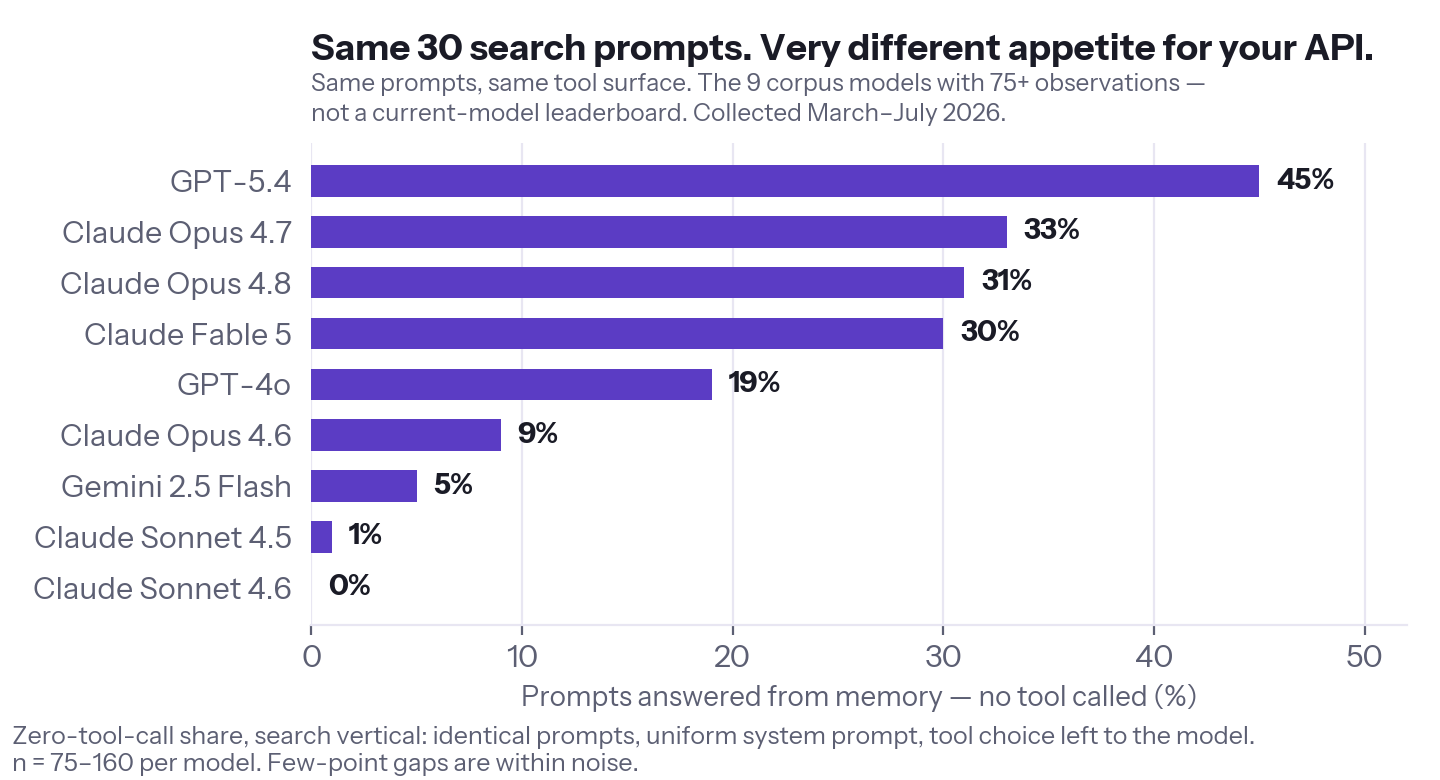
- Your biggest competitor isn't another API… it's the model's memory. On the same 30 search prompts, tool-skipping ranged from 0% to 45% depending on the model. Several flagship models skip 30% or more!
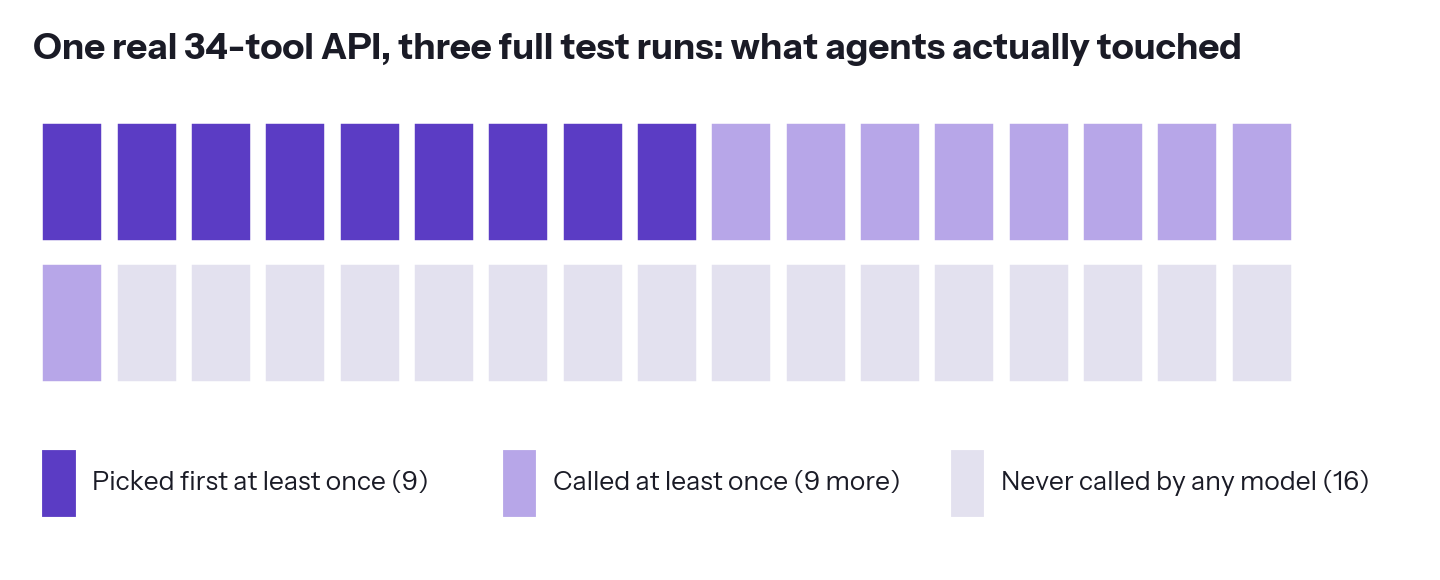
- Half a real 34-tool surface went untouched. Across three full test runs, 16 of its 34 tools were never called by any model, and only 9 were ever picked first. In clients that load the full surface eagerly, every untouched tool still represents a token tax on every call.
- Tool budgets are real — the OpenAI tool interface we tested caps at 128 tools. In our August 2026 runtime test, 128 loaded and 130 was rejected before inference, and the budget is shared across every server the client loads. Clients that defer tool loading can avoid the cap; if you can't control which client loads you, design for it.
- Even careful "improvements" can regress — in independent research, fully augmented tool descriptions improved the median result and still made things worse in 1 of 6 evaluated cases. These patterns are directions, not guarantees. Measure before you ship.
Get chosen
Describe the task, and say what the model doesn't know
Agents pick tools by matching your description against the user's task. In our testing, that's the single highest-leverage thing you can change. Brand and name recognition mattered surprisingly little when we tested it directly: anonymizing server names barely moved selection. The words themselves are what matters.
So — describe the job, not the endpoint. "Get task data" tells the model nothing. "Search tasks by project, assignee, status, or due date" tells it exactly when to reach for you.
Another potential pitfall is easy to overlook: the model's own training data. When an agent gets a question, it can call your endpoint — or answer from what it already knows, instantly and for free. Give it a reason not to! If your data is live, private, authoritative, or the product of computation the model can't do from memory, say that in the description. Give the agent the novel-data catnip it so deeply craves.
Keep your tool count low — bundle related tools
In the OpenAI tool interface we tested (August 2026), requests exposing more than 128 tools were rejected before inference. Not degraded — rejected, so the model never sees any of them. We verified it at runtime: 130 tools returns an error; 128 goes through. Treat it as a constraint of eager tool loading, not a universal law — clients that defer tool loading can expose bigger surfaces.
This cap applies to the client's entire assembled toolset, not just yours. If a user loads your 40 tools next to two other servers, you're sharing that 128 budget — and someone gets cut. Assume you get a slice, not the whole thing.
Big surfaces also tax you on every call: in clients that load your full surface into context eagerly, the model reads every definition each time, even when it uses one tool. Deferred tool loading reduces that tax (where the client supports it). And most big surfaces carry tools nobody exercises; on one 34-tool API we tested, 16 tools were never called by any model across three full test runs of our task suite.
(One safety rule bundling should respect: bundle reads freely; keep writes — especially destructive ones — as their own tools, because clients grant permissions per tool name.)
The trendy version of the use-small-tool-counts argument says big tool lists confuse models into misusing them. Surprisingly, that's not actually what we've measured.
Below the caps, call quality stayed near-ceiling — 99.5% schema-valid and 98.8% semantically sensible across 5,300+ calls on developer-tool surfaces up to 100 tools. The measured costs of a big surface are the cap, the token tax, and the unexercised surface — not confusion. Fewer, more flexible tools is still the pattern, though in our data the reason is economic, not model collapse.
Get called correctly
Accept human words as input
A developer reads your docs, finds the ID format, and moves on. An agent gets "what's ethereum trading at?" and has to bridge from human words to your input format on the fly.
In our corpus, APIs that accept natural inputs — city names, ticker symbols, owner/repo strings — sat near zero friction. APIs that demand internal IDs, slugs, or coordinates forced extra discovery calls before any useful work. That's cross-API correlation, not a same-API A/B test — but every extra call is another chance to fail, another hit to your rate limit, and more cost for whoever runs the agent.
Three refinements keep this safe. Keep accepting canonical IDs alongside the human words. When a name matches several things, return the candidates. And for destructive operations, require the canonical ID: "delete the project called Website Redesign" should never fuzzy-match its way to the wrong one of three.
Point agents to your discovery endpoint — in the description and in the error
This is arguably the most straightforward high-leverage fix on the list. On one API we audited, the most common hard failure had exactly this shape: the model guessed an asset ID, got a bare 404 back, and had no route to an answer it was one call away from.
The fix is one sentence. Put "use list_assets to find valid IDs" in the lookup tool's description. Then put it in the 404 body too — "not found, try /assets?search=" gives a stuck agent its next move. A bare "not found" gives it nothing, and nothing is how retry loops start.
(On a brief don't-get-prompt-injected note, be aware that models may treat hint text as instructions, so treat every hint as an instruction-bearing surface. Keep imperative hints entirely server-authored and templated. Treat echoed user content as untrusted data; keep it structurally separate from the guidance, never part of it. An error body that reflects attacker-controlled text into imperative guidance is a recipe for a bad day.)
The general rule: every failure state should tell the agent the cause, whether retrying can help, and the next action. That applies well beyond 404s. An auth error that names the missing scope is recoverable; a bare 403 is a dead end the agent will retry against anyway, burning its budget on the wrong interpretation.
Give parameters clear names — rename before you remove
Don't assume parameter count is the problem. Models handled 8-parameter tools fine when the names explained themselves — and ignored 2-parameter tools with cryptic names. (Eight clear scalars is not a license for 25 nested, coupled fields — but fix the names before you delete capability.)
And prefer the conventional name where one exists — limit, fields, query. A merely descriptive invention is a downgrade from a name every client and model already handles.
Set rate limits for agent traffic, not human traffic
In our corpus, agents averaged ~2.5 API calls per completed task — and 4.4 on the heaviest vertical: discovery, the real call, a retry, maybe a comparison. Free tiers sized for a human clicking one thing at a time break the moment agents show up.
We watched this play out by task type: simple lookups completed even through throttling, while multi-call tasks — comparisons, screening — collapsed, because the fourth call in the sequence is the one that hits the limit. If agents matter to you, your rate limit is a product decision now, not an infrastructure default.
Get the user their answer
Return honest payloads
When your API returns partial data, the model doesn't bat an eyelash; it often fills the gaps with invented values that look exactly like real ones: realistic prices, plausible dates, and confident precision. We've watched this happen across model families.
Clearly you don't want to make models hallucinate like they're at a Grateful Dead show in 1972. But how can you avoid this?
It turns out the don't-make-shit-up checklist is fairly simple. Don't return an empty result wrapped in a 200 that reads as success. Don't return an error message with a success status code. And when data is partial, say so explicitly; a completeness flag lets the model distinguish "that's all there is" from "data may be missing," instead of improvising the rest.
The broader principle, where it fits your data: expose freshness, units, provenance, and whether a field is genuinely null versus simply unavailable.
Right-size your responses
Here's another failure that will likely be missing from your logs: the agent calls your endpoint, your endpoint dutifully returns everything… and proceeds to flood the context window. Two steps later the task dies mid-answer, looking nothing like a server problem when in fact it's something you, dear endpoint publisher, have total control over.
We measured this as its own failure stage. On the search-shaped services in our corpus, useful data often arrived and the answer still didn't: payloads were useful 93–99% of the time, while tasks completed only 42–67% of the time. The data arrived. The answer died anyway.
The fix directions: size your default pages in tokens, not rows. Offer a fields parameter so an agent can pull three fields instead of forty. Return every slice with its metadata — returned, total, a cursor — so the model knows it's holding a slice. And when you truncate, say so explicitly; silent trimming turns into confident wrong answers downstream.
Diagnose before you fix — by stage, by task type, by effort
Every service we've tested fails in its own place. Our weather vertical's failures were execution failures — timeouts, concentrated in one unreliable server while its neighbors ran clean. Four search services executed perfectly and failed on payload quality. Crypto testing was dominated by rate limits and access tiers. And one large devtool surface failed before a single call — too many tools to load. A better description fixes none of those. Know your stage first.
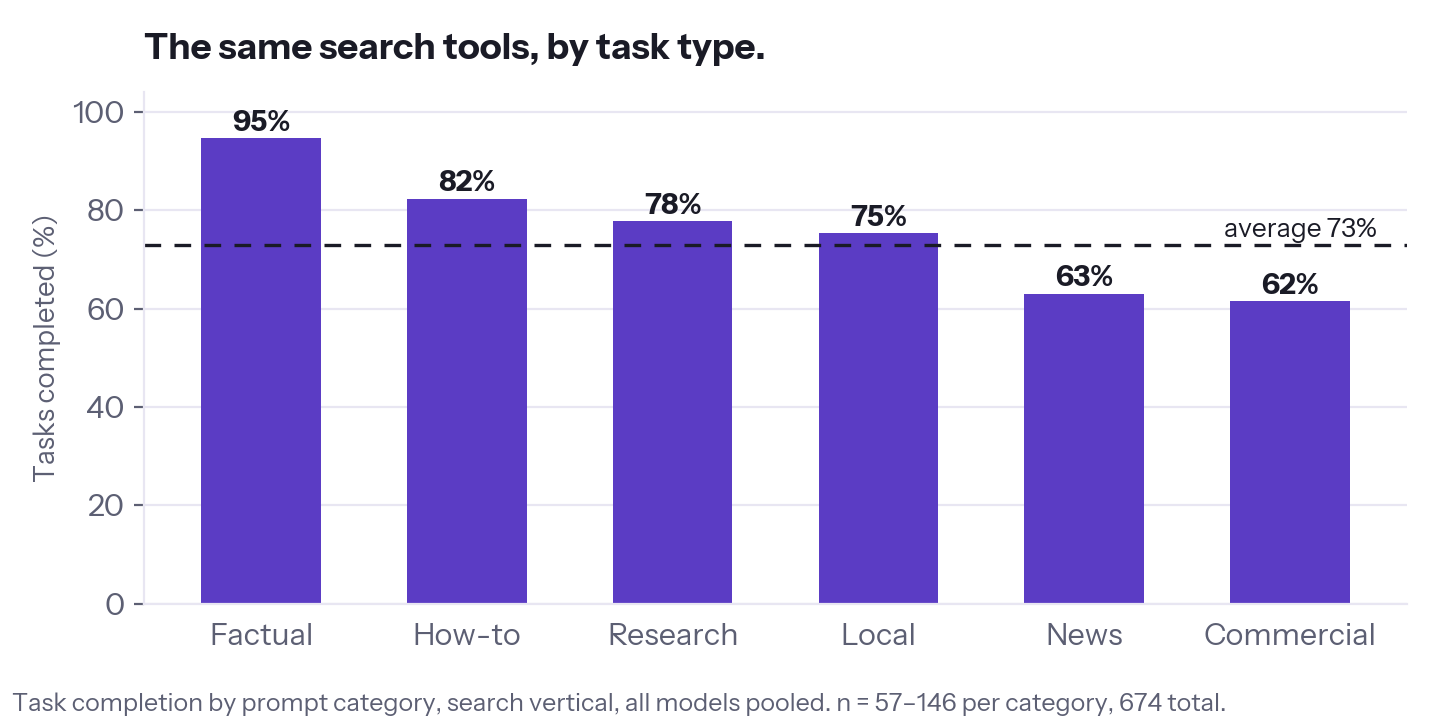
Then break results down by task type, because averages lie. And watch how hard agents work, not just whether they succeed: some models brute-force through a broken flow with retries. The task completes, the score looks fine, and the fragility is invisible until a cheaper model or a stricter token budget shows up. High effort is your API's friction being paid for by the incoming agents' inference bills.
Measuring it yourself for fun and profit
Here's the version you can run in a day:
1. Pull 20 prompts from real user questions — the things people actually ask, not happy-path demos. Cover your main task types.
2. Run them against three models from different families with your tools loaded and a plain, generic system prompt. Same setup for every model. A generic harness isolates your endpoint's behavior; if one production client matters most to you, run a second pass inside it.
3. Record four things per run: Did the model call your tool at all? Did the call succeed? Was the payload usable? Did the user's question actually get answered — and in how many calls?
4. Change one thing. Re-run each condition at least twice — treat a difference smaller than your own run-to-run gap as inconclusive.
5. Keep what moved the numbers; revert what didn't. This step is where you catch the regression the research warns about, before your users do.
The cheap version tells you whether you probably have a problem. If you'd like deeper insight, our full audit tells you where it is, how large it is, whether a fix actually moved it — and whether that holds across models.
| DIY in a day | Full audit |
|---|---|
| ~20 prompts | Broad task suite across your real task types |
| 3 models | 6 frontier models |
| 2 runs per condition | Replicated runs |
| Manual comparison | Per-stage attribution across hundreds of calls |
Your next users won't be human
These nine patterns are directions, not guarantees. In independent research, fully augmenting tool descriptions — the most popular fix on this list — improved the median result and still made things worse in 1 of 6 evaluated cases (Hasan et al.).
That's one tricky aspect about optimizing for agents. Whether a specific change helps your API, on the models your users actually run, is an empirical question. The answers may sometimes surprise you.
So please, steal these patterns. Then test the before and after instead of trusting the vibes. If agents already call your API, they're succeeding or failing in ways your logs can't see. The only real question is whether you find out before your users do.
You can also run our free Agent Readiness Scan — see which of your tools agents pick, misuse, or ignore — or book a live audit: six frontier models, real calls against your production endpoints, measured results plus recommendations specific enough to turn straight into engineering tickets.
This is a unique moment in time; humans are getting replaced by agents with virtual minds of their own. Build with those agents in mind, and your endpoint will have a much brighter future.
tracingviolet.dev · hello@tracingviolet.dev · @seven7hwave
Method, in one line: real AI models receive realistic user prompts with tool surfaces loaded, send real API calls to production endpoints, and we score every stage — selection, execution, payload quality, and whether the user's question was actually answered. Findings are observed patterns from our test corpus, not guarantees of behavior on any specific API. Inline before/after examples use a fictional project-tracker API — they illustrate patterns observed across our corpus, not measured fixes for any real service. External citations: Wang et al. (arXiv 2602.18914), Hasan et al. (arXiv 2602.14878), Datadog engineering blog (2026).
This guide is general engineering information, not professional advice for your specific system, and it's provided as-is, without warranty of any kind. Some changes that help on average can regress an individual API — the research above measured exactly that — so test any change against your own traffic before shipping it, and treat the results, not this guide, as the authority. tracingviolet isn't liable for outcomes of changes you make based on this material. © 2026 tracingviolet · hello@tracingviolet.dev
What this guide doesn't cover (yet)
The nine core patterns start from failures we've watched in live testing, and our corpus is read-heavy. That leaves real production territory outside the measured set:
Authentication and authorization. A 403 that names the missing scope is recoverable; a bare one is a dead end agents retry against anyway. The machine-actionable-error rule from pattern 04 clearly applies here — we just haven't measured auth failures at scale yet.
Write safety. Idempotency keys, dry-runs, confirmation boundaries, reversibility. One thing we'll say ahead of the data, because the asymmetry is structural: an agent retrying a price lookup twice is noise; an agent retrying a refund twice is an incident. Until measured guidance exists: keep high-impact writes separately named, and support idempotency keys on retriable, non-idempotent writes.
Long-running operations. Timeouts, async job handles, progress, cancellation — we've observed timeout failures but haven't tested the async patterns that fix them.
The rest of the MCP surface. Resources, prompts, tool annotations, structured output schemas, elicitation — plus tool-name collisions when several servers load into one client. Real leverage is likely to be found there.