MCP Resources vs. Tools vs. Prompts: When to Use Each
The Model Context Protocol has three primitives — tools, resources, and prompts. Most servers only use tools. Here's what each one does, when agents actually use them, and why the distinction matters more than you think.
If you're building an MCP server, you've probably noticed three primitives in the spec: tools, resources, and prompts. Most servers implement tools and ignore the other two. That's often the right call — but not always, and understanding why requires looking at how agents actually interact with each primitive.
We've tested tool interactions across 4,914 observations, 5 models, and 5 verticals. Here's what we've learned about how agents engage with different MCP surface types — and what it means for your architecture decisions.
- ▸Tools handle 95%+ of agent-to-server interaction — they're the right default for any API wrapper
- ▸Resources eliminate input friction — APIs requiring ID lookups saw over 20% of observations needing prep calls; a resource listing valid IDs prevents this
- ▸Prompts are almost absent in the ecosystem today — but they're valuable for encoding proven multi-step workflows
- ▸Don't add primitives "just in case" — unnecessary context adds token cost without value; OpenAI models reject surfaces exceeding 128 tools
// finding 01
The three primitives, briefly
Tools are functions the agent can call. The agent sends structured input, the server executes something, and returns a result. This is the workhorse — search queries, API calls, database lookups, file operations. The agent decides when and how to call them.
Resources are data the agent can read. Think of them as files or endpoints the agent can pull from — a database schema, a configuration file, a knowledge base document. The agent (or the client application) requests them by URI. Resources are pulled, not called.
Prompts are reusable templates that the server offers to guide the agent's behavior. A prompt template might be "summarize this repository" or "review this pull request" — pre-built workflows that combine context and instructions. The user or client application selects them; the agent doesn't choose prompts autonomously.
// finding 02
Should your MCP server use tools, resources, or prompts?
In our testing across 17 validated MCP servers and 5 verticals, the overwhelming majority of agent-to-server interaction happens through tools. When a user asks "what's the price of bitcoin?" or "find coffee shops near Times Square," the agent needs to do something — call an API, execute a query, fetch live data. That's a tool.
Resources and prompts serve different interaction patterns:
| Primitive | Agent initiates? | Returns | Best for |
|---|---|---|---|
| Tools | Yes — agent decides when to call | Dynamic result from execution | API calls, queries, actions, anything requiring parameters |
| Resources | Sometimes — client/agent reads by URI | Static or semi-static data | Context loading, schemas, documentation, reference data |
| Prompts | No — user/client selects | Template with parameters | Guided workflows, common task patterns, onboarding |
If your server wraps an API, tools are almost certainly the right primitive. Resources become valuable when you have context the agent needs to do its job well — not the result of a query, but the background knowledge that makes queries better.
// finding 03
When should an MCP server use resources instead of tools?
Resources shine in a specific scenario: when the agent needs context that isn't a response to a question.
Consider a dev tools server. The agent needs to know the repository structure, the CI configuration, the team's coding conventions. These aren't things you "query" — they're context that makes every subsequent tool call better. That's a resource.
A crypto data server probably doesn't need resources. The agent asks questions, gets answers. But a financial analysis server might expose a resource containing the list of supported assets, their ticker-to-ID mappings, and the available data fields — context that prevents the agent from making failed discovery calls.
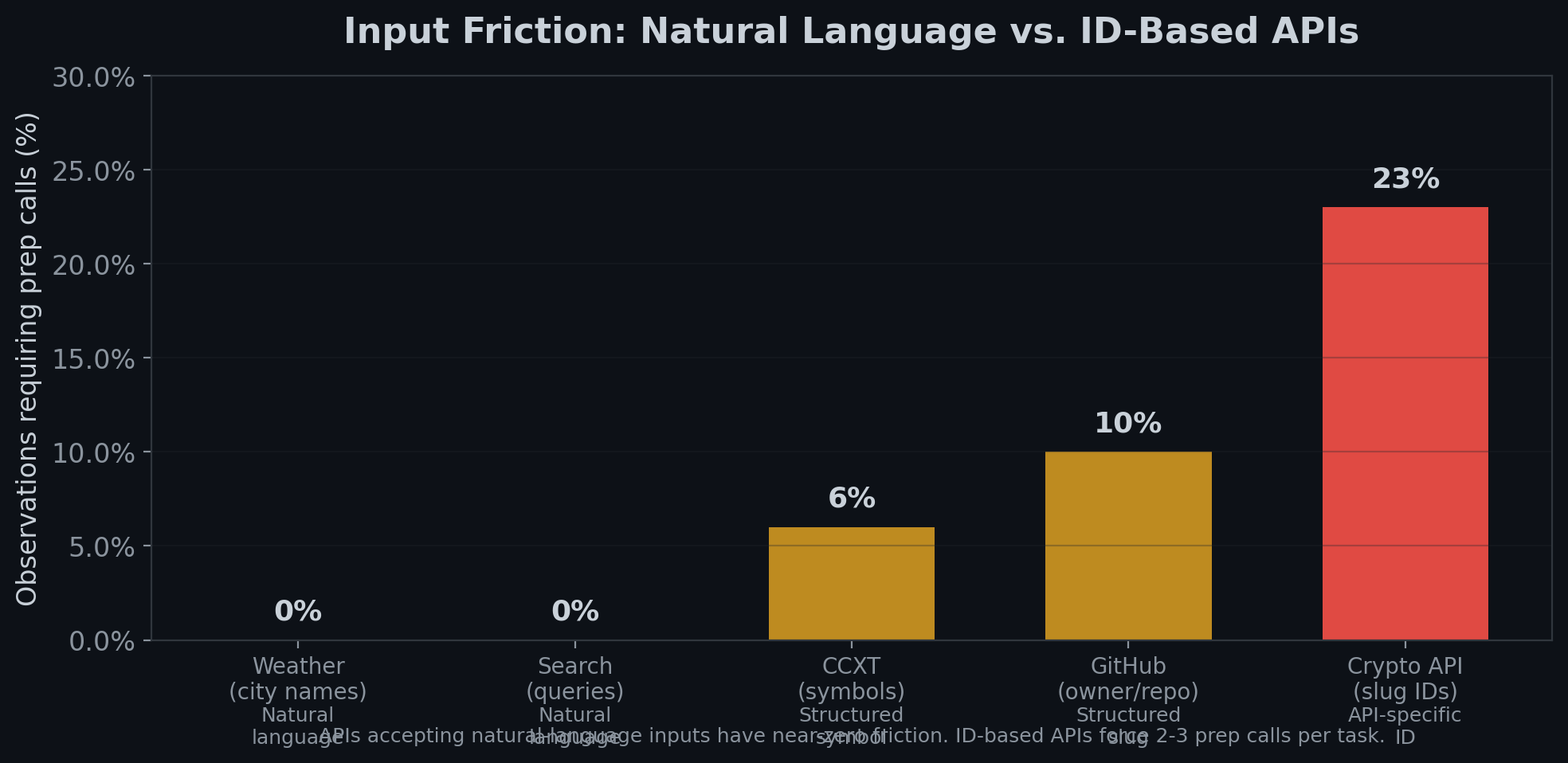
In our testing, input friction — the extra work an agent does before making a value-producing call — was 4.5% overall but spiked to over 20% on APIs requiring slug or ID lookups. A resource exposing the valid ID list could eliminate most of that friction before the first tool call ever happens.
The friction bridge pattern
This is the most practical use of resources we've identified:
- Resource exposes the valid inputs (asset IDs, project slugs, supported parameters)
- Agent reads the resource at the start of the session
- Tool calls use correct IDs from the start — no discovery calls needed
Without the resource, our data shows models make 2-3 preparatory calls per task on ID-based APIs. With a well-structured resource providing valid IDs upfront, those prep calls should drop to near-zero.
This is especially relevant for APIs where we observed high input friction: - Crypto APIs requiring exact asset slugs (over 20% of observations needed prep calls) - Dev tools APIs requiring numeric project IDs (~10% friction rate) - Any API where the model has to "discover" valid parameter values before doing useful work
// finding 04
When should an MCP server use prompts?
Prompts are the least-used primitive in the MCP ecosystem, and for most servers they're unnecessary. But they serve a real purpose: reducing the gap between what a user wants and what the agent needs to hear.
A user says "review this PR." The agent needs to know: which repo, which PR number, what to focus on (security? performance? style?), what format to use, and what standards to apply. A prompt template pre-fills most of that:
Review PR #{pr_number} in {repo} focusing on {focus_areas}.
Apply the team's coding standards from the .github/CONTRIBUTING.md resource.
Use the code_review tool to fetch the diff and the get_file tool for context.
The prompt bridges user intent to agent execution. Without it, the agent has to figure out the workflow from scratch. With it, the agent has a proven path.
Prompts are most valuable when: - Your server supports complex multi-step workflows - Users repeatedly ask for the same type of task - The optimal tool sequence isn't obvious from tool descriptions alone - You want to guide agents toward using your tools correctly
// finding 05
How to decide which MCP primitives to implement
Here's how to decide what to implement:
Start with tools. If your server wraps an API, this is where 95% of your value lives. Get tool descriptions right first — our data shows task-shape matching in descriptions is the single strongest driver of whether agents use your tools at all.
Add resources when you have reusable context. Valid input lists, schemas, configuration, documentation. The test: "Would an agent make better tool calls if it had this information before starting?" If yes, it's a resource.
Add prompts when you have proven workflows. Multi-step task patterns that you've validated work well. The test: "Do users repeatedly ask for the same type of task, and does the agent struggle to figure out the right sequence?" If yes, it's a prompt.
Don't add resources or prompts "just in case." Every primitive you expose is more context for the agent to process. In our testing, servers with 128+ tools were rejected outright by OpenAI models. The same principle applies at a smaller scale — unnecessary primitives add token cost without adding value.
// finding 06
What are the most common MCP architecture mistakes?
Mistake 1: Exposing data as tools when it should be a resource. A "list all supported assets" tool that the agent calls before every real query should be a resource that the agent reads once at session start. Our data shows models call list/search endpoints 2-3 times per task on average when the information isn't pre-loaded — that's wasted calls and tokens.
Mistake 2: Not exposing any resources on an ID-heavy API. If your tools require exact slugs, numeric IDs, or enum values that the agent can't guess, a resource listing valid values prevents a measurable friction cost. In our testing, APIs accepting natural-language inputs had near-zero friction. APIs requiring exact IDs had 10-20%+ friction rates.
Mistake 3: Making prompts that duplicate tool descriptions. A prompt that just says "use the search tool to search" adds nothing. Prompts should encode workflows — the sequence of tools, the right parameters for common cases, the resources to consult first.
// finding 07
What the data says about the overall ecosystem
Across the 17 MCP servers we validated in detail, the pattern is consistent:
- Tools dominate. Every server has tools. Tool description quality is the primary determinant of whether agents use a server effectively.
- Resources are rare but high-impact where used. Servers that expose valid-input resources reduce agent effort measurably.
- Prompts are almost absent. This may change as the ecosystem matures and servers handle more complex multi-step workflows.
The current ecosystem is overwhelmingly tool-first. That's appropriate for the current state of agent capabilities. As agents handle longer, more complex tasks — coordinated multi-tool workflows, autonomous research, ongoing monitoring — resources and prompts will become more important. For now, getting your tools right is the highest-leverage investment.
// appendix
Methodology and disclosure
Observations about tool usage patterns are based on 4,914 observations across Claude Sonnet 4.6, Claude Opus, GPT-4o, GPT-5.4, Gemini 3.1 Pro, and Gemini Flash, tested against real production API endpoints. Input friction measurements are derived from call-sequence analysis across the full corpus. Server validation covers 17 MCP servers across 5 verticals with source-code-level schema verification.
Results reflect observed model behavior during controlled testing and may not represent real-world usage patterns. The MCP ecosystem evolves rapidly — resource and prompt support varies by client application, and not all clients expose all primitives to models.
Want to see how agents interact with your tool surface? Run a free Agent Readiness Scan →
Want this run against your own tools?
We test your endpoints live across multiple models and deliver a report with specific, ship-ready fixes.
Book an audit →